Getting Started: Guardian and AWS
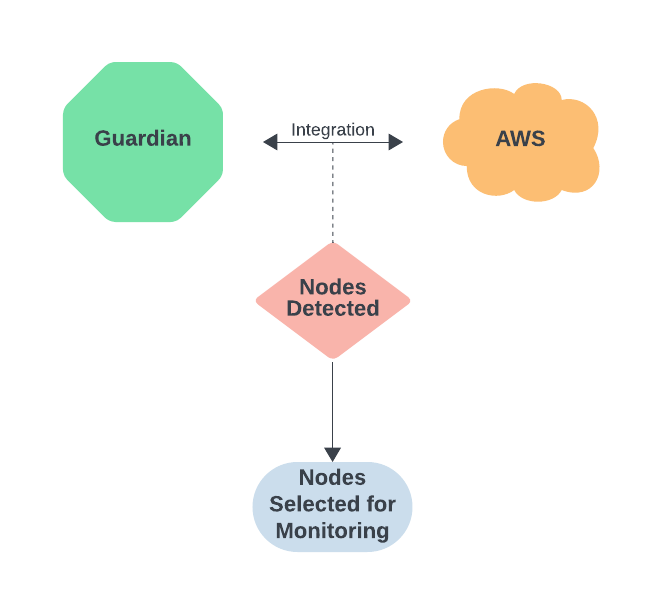
If your organization uses Amazon Web Services (AWS) as part of its IT management, you can connect your AWS instance directly to Guardian by setting up an AWS integration. An AWS integration allows you to schedule various jobs within Guardian that rely on the assets already present in your AWS instance. For example, once you configure an AWS integration, you can create a scheduled job in Guardian to synchronize the nodes in your Guardian inventory with the devices in your AWS instance. This removes the need for you to add or otherwise maintain these nodes manually.
This topic walks you through the necessary steps to establish the connection between AWS and Guardian, which will automatically set up a scheduled job to synchronize your nodes between Guardian and AWS, as well as how to select which nodes to monitor.
Step 1: Add an AWS Integration
To start using Guardian in conjunction with AWS, you'll first need to connect Guardian to your AWS instance. To do that, you'll set up an AWS integration. For a step-by-step guide on setting up this integration, see AWS Integration. Then, return to this topic.
Once you've set up your AWS integration, Guardian automatically creates a scheduled Synchronize Nodes job set to run every two hours. This job will take a look at the devices present in AWS and add them to the Detected tab (Inventory > Detected) in Guardian. For more information on this type of job, see Synchronize Nodes – Job Type.
From here, all that's left to do is tell Guardian which nodes you'd like monitor.
Step 2: Select Nodes to Monitor
After your Synchronize Nodes job completes its initial run, you'll see all nodes detected in your AWS instance under Guardian's Detected tab. You'll likely notice that Guardian has detected many more nodes than what you actually want to use Guardian to keep an eye on. This is to be expected as what's listed on the Detected tab serves as a sort of staging area where you can select nodes for Guardian to monitor. Monitoring a node means the node will be scanned and data will be collected. You can then run policies or benchmarks against that data to ensure configuration compliance, view configuration differences, and more.
To learn how to select a node for monitoring, see Prepare Node(s) for Monitoring.
Next Steps
Now that you've set Guardian to monitor the proper nodes, see Monitor Rarely Changing Configuration Items for information on setting up drift detection and alerting. You can also browse our Policy Library to view policies applicable to AWS nodes. From there, you can apply those policies to your nodes to ensure they are meeting the right configuration requirements.