Register Your Account
To register an account with Cloudhouse Guardian (Guardian) you must receive an email invitation to join your company's organization. The following process describes how to register an account with Guardian. For information on how to send a registration invite, see Invite Users.
Invitation
If you have been invited to join a Guardian organization, you should receive the following email from 'Guardian_Notifications@Cloudhouse.com'.
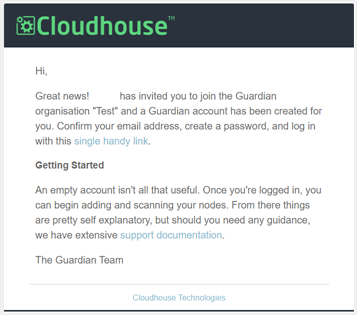
Click the link provided to begin the process of registering an account with Guardian. The Guardian Registration page is displayed.
Registration
When registering an account with Guardian, you are required to provide personal information such as your first name, last name, and email for identification purposes. For more information on the validation criteria for each of these fields, see Validation Criteria criteria below.
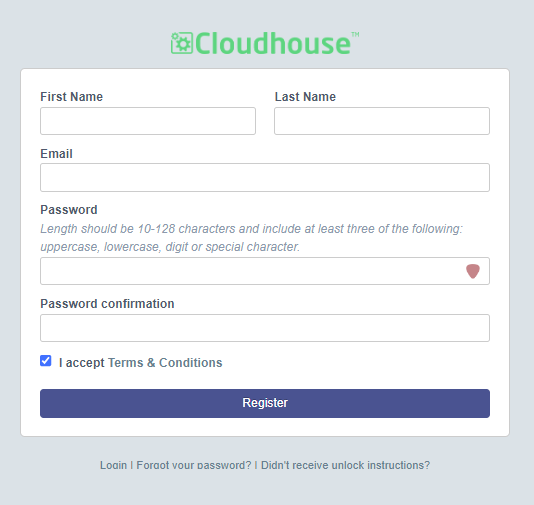
On the Guardian Registration page, the following values are displayed:
| Option | Description |
|---|---|
| First Name field | - The first name of the account holder. |
| Last Name field | - The surname of the account holder. |
| Email field | - The email of the account holder. |
| Password field | - The password for the account. |
| Password confirmation field | - The password for the account. |
| I accept Terms & Conditions checkbox | Confirmation that the account holder has read and accepted the Cloudhouse Website Terms and Conditions. |
Once you have entered the correct value in each of the fields above, click to Register your account in Guardian. If the information provided in each field matches the validation criteria, the account is created and you are automatically signed into your instance of Guardian. The following confirmation message is displayed, 'Account registered successfully'.
Validation Criteria
The following table describes the validation criteria for each of the fields displayed on the Guardian Registration page.
| Field Name | Validation Criteria | Error Message |
|---|---|---|
| First Name | This is a free format field, enter any value to continue. | If no value is entered in this field, the following error message is displayed 'Please fill out this field'. |
| Last Name | This is a free format field, enter any value to continue. | If no value is entered in this field, the following error message is displayed 'Please fill out this field'. |
| The email entered in the field must meet the following criteria: - The email must contain an '@' symbol - The correct email address format must be used. For example, '[username]@[domain-name].[domain]'. | If no value is entered in this field, the following error message is displayed 'Please fill out this field'. If an '@' is not included in this field, the following error message is displayed 'Please include an '@' in the email address. '[username]' is missing an '@'.' If an incorrect email address format is used, the following error message is displayed 'A part following '@' should not contain the symbol'.' | |
| Password | The password entered in the field must meet the following criteria: - The length must be between 10 - 128 characters - Must include at least one numeral or special character, e.g. '1', '!', or '@' - Must include an upper case and lower case character. | If no value is entered in this field, the following error message is displayed 'Please fill out this field'. If the value entered in the field is lower than 10 characters, the following error message is displayed 'Password is too short (minimum is 10 characters)'. If the value entered in this field is higher than 128 characters, the following error message is displayed 'Password is too long (maximum is 128 characters)'. If the value entered in this field does not contain at least one numeral, the following error message is displayed 'Password does not contain at least one numeral'. If the value entered in this field does not contain at least one special character or one numeral, the following error message is displayed 'Password Complexity requirement not met. Length should be 10-128 characters and include at least three of the following: uppercase, lowercase, digit or special character'. |
| Password confirmation | The password entered in the field must meet the following criteria: - The length must be between 10 - 128 characters - Must include at least one numeral or special character, e.g. '1', '!', or '@' - Must include an upper case and lower case character - Must match the value entered in the Password field. | If no value is entered in this field, the following error message is displayed 'Please fill out this field'. Assuming all the above criteria is met, if the value entered in this field does not match the value entered in the Password field, the following error message is displayed 'The passwords that you entered do not match'. |